
Most owners are one of two kinds. Some never ask for reviews because it feels awkward. Others ask in ways that break Google's rules without knowing it. Either way, the fix is the same: a simple, fair, repeatable way of asking.
Asking is allowed
Google's policy says you may ask customers for reviews, as long as the review represents a genuine experience and you do not offer incentives or try to influence the rating or contents. Reviews also count toward how well known your business is, which is why they matter for local results.
What Google does not allow
Google's list is short and clear. Do not:
- Offer anything in exchange. No payment, discounts, or free goods or services for posting a review, or for changing or removing one. Google calls this strictly prohibited.
- Ask only the people you expect to be happy. Google does not allow selectively asking for positive reviews, or discouraging negative ones. That includes a "how did we do?" question first, with only the happy people sent on to the review site.
- Pressure people on your premises. Do not require or push customers to leave a rating while they are with you.
- Ask for specific content. Do not request particular words, or that a review mention a named staff member.
- Set quotas. Do not tell staff to collect a certain number of reviews.
Two more rules from us, which follow from the above. Do not write the review for anyone. And do not have friends, family or staff post reviews for you.
What the FTC adds
In the United States, the Federal Trade Commission has a rule on fake and bought reviews. Its published questions and answers say it covers things like buying fake reviews, and incentives that depend on the review saying something positive. The FTC says organizing reviews is not suppression, and that you may reply to a negative review but may not knowingly make a false accusation about the reviewer. On asking only happy customers, it says the rule has no specific ban but the practice "could violate the FTC Act." Google bans it outright.
The FTC's rule is not the same as Google's. The FTC does not ban every kind of incentive. Google's policy does, and Google's policy is the one that governs your Google profile. So the simple, safe rule for a Google review is: offer nothing. This is general information, not legal advice.
The ask, in four parts
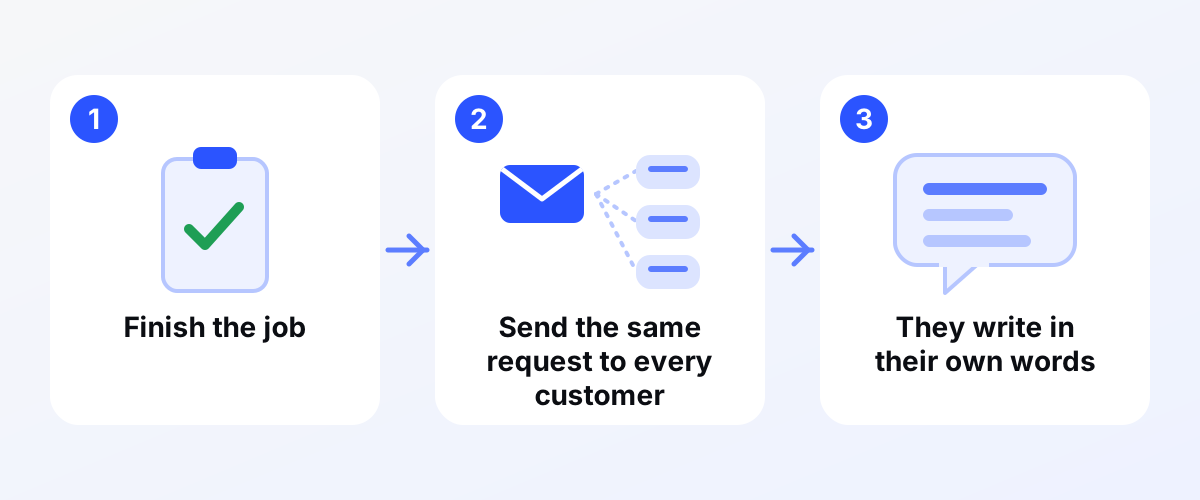
- Same ask for everyone. Pick a fixed point after the job, such as a few days after you finish, and send everyone the same message. Not just the people who thanked you at the door.
- Make it easy. You can ask customers to visit a link or scan a QR code. Your Business Profile can give you a link.
- Keep it theirs. Say it is entirely up to them and that what they write is theirs. Do not suggest wording, stars, a keyword or a town.
- Ask once. If they do not reply, stop. Write down "asked" with the date.
Three messages you can adapt
Email. Subject: Thank you, [first name]. Hi [first name], thanks for choosing [your business]. If you would like to share your experience, you can do it here: [review link]. It is entirely up to you, and what you write is yours. [Your name]
Text message, only to customers who agreed to get texts from you. Hi [first name], it's [your name] from [your business]. Thanks for choosing us. If you would like to share your experience on Google, here is the link: [review link]. It is up to you. Include whatever opt-out line your texting tool requires. Whether a given customer may be texted is a legal question, so check before you send.
Card or QR code, handed over at the end of the job. Thanks for choosing [your business]. If you would like to share your experience, scan this. It is up to you. No one stands over the customer.
Before you use any of them, check each message against the list: it offers nothing, it goes to everyone the same way, it suggests no wording, and it asks once.
Reply to every review
Replies show customers their feedback matters, and Google encourages them. Keep them short, personal and prompt. For a good review, say thanks. For a bad one, stay calm, say what you will do and take the details offline. Do not reveal anything private about the customer or the job. Do not offer a discount or free service in exchange for a changed or removed review. Google prohibits that, just as it prohibits paying for one. If a review looks fake or breaks Google's content policies, you can flag it. Do not flag an honest negative review just because you dislike it.
Our page on reviews and reputation explains how we set up a fair process for clients, and email and text follow-up covers the sending side. How reviews fit into local results is on our page about Google Maps and local SEO.
What to do this week
- Write one message from the templates above, in your own voice.
- Decide the fixed point after a job when it goes out, and write it down.
- Get your review link from your Business Profile and test it on your phone.
- Send the same message to your next five finished customers.
- Reply to every existing review you have not answered yet.
- Check any old messages you have: remove any reward, any wording you suggest, and any "if you were happy" filter.
What this does not promise
This is general information, not legal advice. Doing all of it does not promise more reviews, a higher spot on the map, more calls or more revenue. Many customers will not reply. Google can remove reviews, and its rules can change.
Not sure what is working now?
Kojo Growth runs a free audit. We compare your reviews with the three businesses above you on the map, among other checks. Tell us your business name or website and the main city you serve. It is free, no strings; if we are not the right fit, the audit is still yours. Ask for your free audit.