
You search "roof repair" from your shop and you're first. A customer across town may not see you at all. You searched from the place where you are most likely to look good. A map-grid scan checks the places you did not search from.
This guide explains what a scan shows, how to read the colors, and what it cannot tell you.
What a scan is
Imagine a service area covered with evenly spaced points, like pins on a map. A scan runs the same search, for example "roof repair", as if from each point, and records where your business showed up in the map results at that point. Each point becomes a circle on a picture of the area.
Why do it this way? Because distance is one of the three things Google says it uses for local results, along with relevance and prominence. A customer standing near your shop and a customer across town can get different results for the same words. A single search from your desk shows one point. A scan shows many.
The key
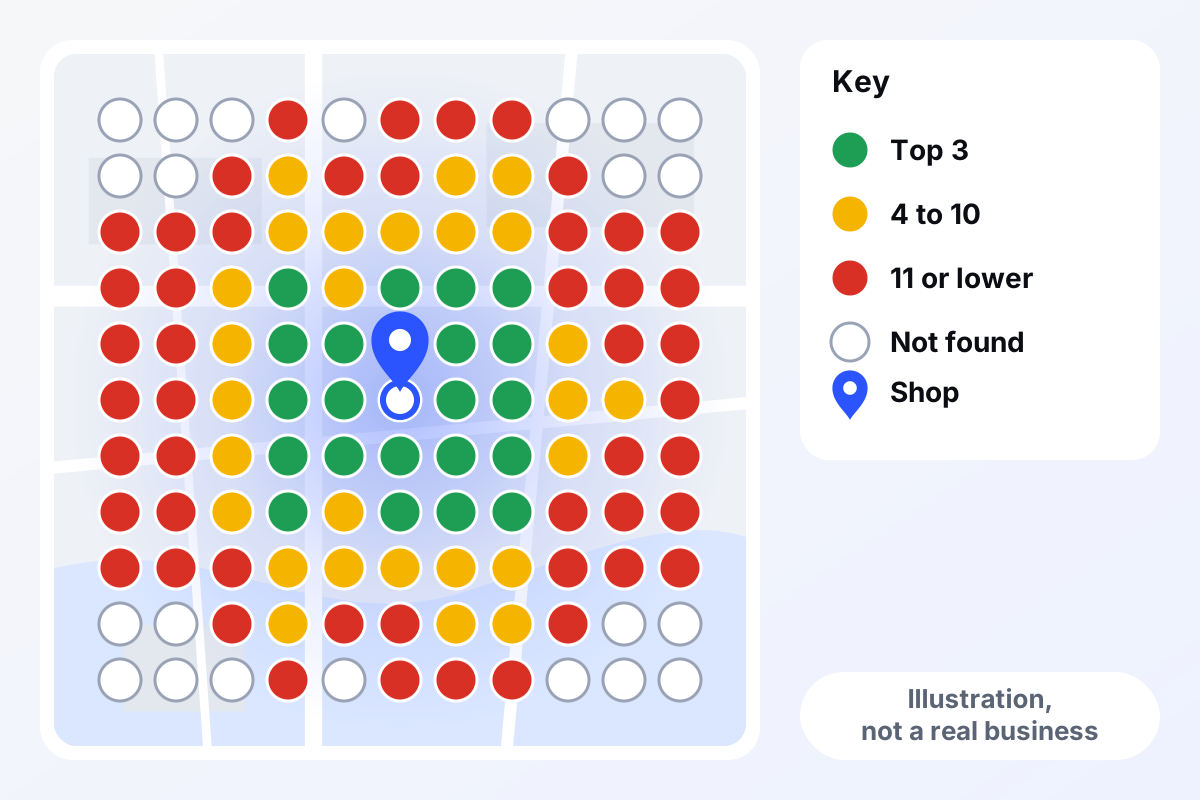
Here is the key we use, the one on the picture below:
- Green: you appeared in the first three results at that spot.
- Yellow: you appeared at fourth to tenth.
- Red: you appeared at eleventh or lower.
- White ring: you were not found in the results that were checked.
How to read the picture
Start with the middle. The circles closest to your shop are usually your best. If they are not green, something is off at the basics: the profile, the category, the reviews. That is worth looking at before anything else.
Look for where green stops. On the picture above, green fades into yellow and then red as you move away from the shop. That is the pattern the distance factor would lead you to expect. We say "would lead you to expect" because it is our reading of what Google tells us, not something Google states about scans.
Look at the shape. Is the weak side the same side where another town sits? Is there a river, a highway or a county line where the colors change? Shapes like that point you at places to investigate. They do not explain anything on their own.
Match it to where your jobs come from. A red patch in a neighborhood you rarely serve may not matter. A red patch where half your best customers live matters a lot. The scan does not know your business; you do.
Compare like with like. One scan is a snapshot. A scan of the same search, area and spacing a month later is a fair comparison. A scan with different words is a different picture.
What a scan cannot tell you
- It is not an official Google measure. As far as we know, scans are made by tools that run searches, so different tools can show somewhat different pictures. This is our understanding, not a Google statement.
- It does not say why. A red spot does not tell you whether the cause is distance, a thin profile, few reviews or a rival with a stronger profile. It tells you where to look.
- It is not every customer. Real searches vary by person, phone and moment. When someone does not share their location, Google uses what it already knows, so what a real customer sees can differ from a scan point.
- It does not predict calls. Green circles are not leads. A scan describes where you appeared, not what people did next.
- One search word is one search word. "Plumber" and "drain cleaning" are different searches with different pictures.
What to do about what you see
Treat a scan as a to-do list, not a score. If the middle is weak, fix the basics: your name, category, hours, phone number and website link should be accurate, and reviews should be real and answered. If the weakness is far out, check your service area is truthful and ask whether the work you want is there at all. Do not chase the colors by faking an address or offering rewards for reviews. Google's rules do not allow either. Our page on Google Maps and local SEO describes how we handle this for clients, and monthly reporting shows how we compare one month with the next.
What to do this week
- Pick one search you want to be found for, in the words a customer would use.
- Choose four places in your service area: near the shop, the far edge, and two neighborhoods where you want more work.
- At each, search that phrase on your phone with location on, and write down where your business appears, or that it does not.
- Mark the places on a paper map using the key above.
- Write down where your last ten jobs came from and compare.
- Pick one gap and one fix, for example a wrong category, and do that fix first.
What this does not promise
A scan is a picture, not a promise. Reading one does not move you up the map, and the colors can change for reasons nobody outside Google can see. Nothing here promises a ranking, calls or revenue. The picture is an illustration, not a result for any real business.
See your own scan
The free audit includes a Google Maps ranking scan across your service area, for your main search. Tell us your business name or website and the main city you serve. It is free with no strings, and the results and the fixes are yours to keep. You can also read how it works or ask for your free audit.